Cheat Sheets / Pokemon Yellow
Pokemon Yellow cheats
To cheat in Pokemon Yellow, use GameShark codes: on a GameShark plugged in with the cartridge, or in an emulator's cheat menu. Yellow keeps most of its values one byte lower than Red and Blue, so a Red code usually does something else in Yellow. The codes below are built from Yellow's own memory map and each one was tested in the game.
GameShark code builder
Your code
- Your save
- Switched off
- Tested
- The format:
01VVAAAA, the address low byte first. How a code works. - Entering codes: a GameShark or an emulator's cheat menu. Where.
- Back up first: items, money, badges and the Pokedex go into your save. Before you save.
- Other lists' codes: 22 of them: 12 work, 8 work with a catch, 1 do not work, 1 not run. The verdicts.
Codes for Red and Blue are one address off in Yellow: use the ones here, or the Red and Blue page for those games.
Every code the builder makes, tested
Each family below was built from the game's own memory map (the address is a label in the game's code, never a number copied from a list), switched on in the game in an emulator, used the way a player would, then switched off to see what stays. The codes shown use the builder's starting values.
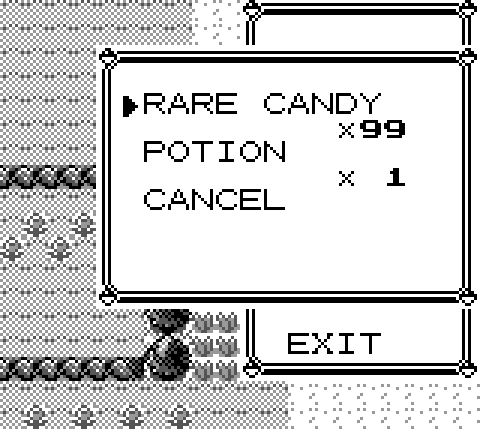
Any item in your bag Tested
Slot 1 of your bag holds RARE CANDY x99.
It stays when you switch the code off.
Pick a slot that already has an item in it. A slot past your last item writes over the bag's end marker, and the bag then lists a junk item after it, even with the code off (tested).
Tested in Yellow. What the run read:
- bag slot 1 in RAM
- RARE CANDY on the bag screen
- quantity 99 on the bag screen
- code off: RARE CANDY x99 stays in the bag
- the end marker after the last item is overwritten while the code is on
- code off: the end marker is still gone
Money Tested
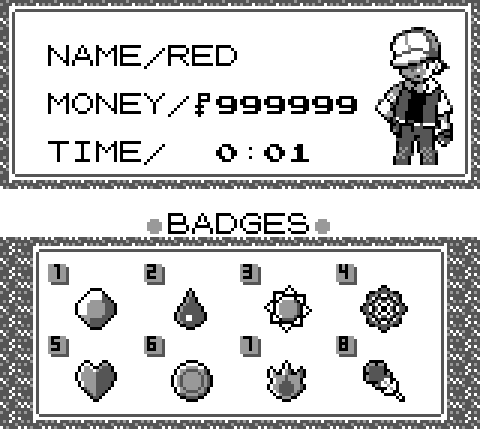
Your money reads 999999. The game stores it as 3 bytes, two digits each.
It stays when you switch the code off.
Tested in Yellow. What the run read:
- money in RAM
- 999999 on the Trainer Card
- badges byte in RAM
- code off: money and badges stay
Any wild Pokemon Tested
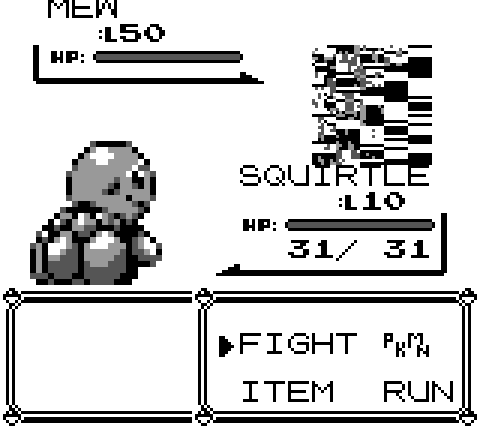
Every wild Pokemon you meet in grass, caves or water is MEW at level 50.
Wild Pokemon are normal again at the next battle.
In battle its picture can come out scrambled: the game draws the picture from the part of the cartridge that the Pokemon it replaced keeps its pictures in. It is still MEW: catch it and you have a real MEW (tested with MEW, caught with a Master Ball). Switch the codes off before a trainer battle: the game builds a trainer's Pokemon from the same bytes (from the code; trainer battles were not tested).
Tested in Yellow. What the run read:
- battle text names MEW
- wEnemyMonSpecies is MEW
- wEnemyMonLevel is 50
- level 50 on the battle screen
- caught
- code off: MEW is in the party
- its level is 50
Walk through walls Tested
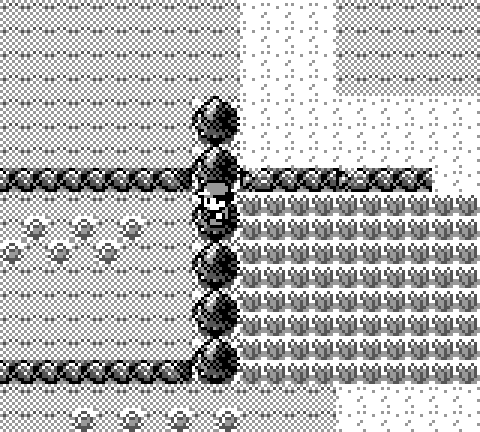
You walk through trees, walls and counters.
Switching the code off does NOT stop it: the byte stays at 1 (tested). From the game's code, it is cleared at the end of a ledge jump or a walk the game moves you on, and it is not in your save, so turning the Game Boy off clears it too.
Walking off the edge of a map where no route joins it takes you into places the game never drew.
Tested in Yellow. What the run read:
- code off: a step left into the trees is blocked
- code on: a step left lands on the tree tile
- and the next step is past the trees
No wild battles Tested
No wild Pokemon from walking in grass, caves or water (tested in tall grass). Trainers still see you, and fishing still hooks Pokemon: the rods start their battles another way (from the code).
Wild battles come back at once.
Tested in Yellow. What the run read:
- no wild battle in 200 steps of tall grass
- control (no code): wild battles happen in the same grass
Badges Tested
The badges you tick are yours: the Trainer Card shows them and the game checks this byte for them.
They stay when you switch the code off.
Tested in Yellow. What the run read:
- money in RAM
- 999999 on the Trainer Card
- badges byte in RAM
- code off: money and badges stay
Pokedex complete Tested
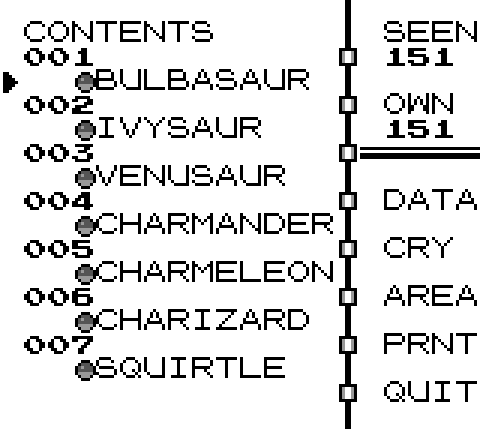
All 151 Pokemon seen and owned. 38 codes: one for each byte of the two flag lists.
The flags stay when you switch the codes off, so you can enter them a few at a time if your GameShark holds fewer codes.
Tested in Yellow. What the run read:
- SEEN 151 and OWN 151 on the Pokedex screen
- code off: every owned flag stays (151 bits set)
Infinite HP in battle Tested
Your Pokemon's HP in battle is set back to 100 every frame.
HP goes down normally again.
Use your Pokemon's max HP. A bigger number shows over the max and stays after the battle (tested with 255 over a max of 31).
Tested in Yellow. What the run read:
- HP stays at the max every turn
- battle PP of move 2 stays 30
- party PP of move 2 stays 30 (the second code)
Infinite PP Tested
Move 1 keeps 35 PP, in battle and in your first Pokemon's own copy.
PP goes down normally again.
The game takes a PP from two places each turn: the battle's copy and your Pokemon's own. A code on the battle copy alone (as most lists print it) lets your Pokemon's own PP run down (tested).
Tested in Yellow. What the run read:
- HP stays at the max every turn
- battle PP of move 2 stays 30
- party PP of move 2 stays 30 (the second code)
Game Corner coins Tested
Your coins read 9999. Stored as 2 bytes, two digits each.
They stay when you switch the code off.
Tested in Yellow. What the run read:
- coins in RAM
- code off: the coins stay
Codes from other lists, tested
The codes most Pokemon Yellow code lists print, each switched on in the game and checked the same way. The address of every code was looked up in the game's own symbol files, so the verdict says what the code really writes to.
| Code | Lists call it | Verdict | What the game does |
|---|---|---|---|
01FF55D3 | All badges | Works | $FF to wObtainedBadges, which is at $D355 in Yellow. The same code the builder makes. |
010138CD | Walk through walls | Works, with a catch | The one address Yellow did not move: wSimulatedJoypadStatesIndex is $CD38 in all three games. It keeps working after you switch it off, until a ledge jump or a scripted walk clears the byte. |
01033BD1 | No random battles | Works | 3 in wNumberOfNoRandomBattleStepsLeft. 200 steps in grass, no battle. |
019946D3019947D3019948D3 | Max money | Works | 999999 in wPlayerMoney, two digits a byte. It stays. |
0115D7CF | Wild Pokemon is Mew (01??D7CF: any Pokemon) | Works, with a catch | wEnemyMonSpecies2, as in Red one byte lower. You meet and can catch Mew; its picture in battle comes out scrambled, as in Red. |
013226D1 | Wild Pokemon level 50 (01??26D1) | Works | wCurEnemyLevel, set before the stats are worked out: a real level 50. The builder's level code. |
01011DD3 | Master Ball (check your items) | Works, with a catch | Only the item byte of slot 1: MASTER BALL with the old quantity. Add 01631ED3 for 99. |
01281DD3 | Rare Candy | Works | Slot 1 becomes RARE CANDY, quantity unchanged. |
01281ED3 | Rare Candies | Does not work | This is the Red address for the item, which in Yellow is slot 1's quantity: your first item becomes x40 (POKé BALL x40 in our test), no Rare Candy. |
01631ED3 | First item x99 | Works | Slot 1's quantity in Yellow. The builder's second item code. |
01282CD0 | Infinite PP, move 1 | Works, with a catch | Battle PP of move 1 reads 40; your Pokemon's own PP still drops, 35 to 32 after three uses. |
01FFD5CF | Never miss | Works, with a catch | $FF in wPlayerMoveAccuracy, the highest the game has; a move still misses 1 time in 256. |
0100E6CF | Wild Pokemon faints at once | Works | 0 in the low byte of wEnemyMonHP: the battle ends before the first menu, with experience. |
0170E8CF | Wild Pokemon can't attack and is burned | Works | $70 in wEnemyMonStatus: frozen, it never moves; the burn still takes HP. The screen shows BRN. |
016446DA | Infinite Safari Balls | Works, with a catch | 100 balls that stay 100; the menu prints two digits, so it reads BALL x 0. 016346DA gives 99. |
01F00DD7 | Infinite Safari Zone time | Works | The low byte of wSafariSteps held at $F0: the counter still read 496 after 30 steps. |
01FF09D3 ...all 39 codes01FF09D301FF0AD301FF0BD301FF0CD301FF0DD301FF0ED301FF0FD301FF10D301FF11D301FF12D301FF13D301FF14D301FF15D301FF16D301FF17D301FF18D301FF19D301FF1AD301FF1BD301FFF6D201FFF7D201FFF8D201FFF9D201FFFAD201FFFBD201FFFCD201FFFDD201FFFED201FFFFD201FF00D301FF01D301FF02D301FF03D301FF04D301FF05D301FF06D301FF07D301FF08D301FF09D3 | Seen every Pokemon (a list of 39 codes) | Works, with a catch | Every byte of both flag lists set to $FF, the last one too: SEEN 152 and OWN 152, one past MEW. The builder's Pokedex codes give 151 and 151. |
017135D7 | Jump on top of anything | Works, with a catch | $71 in wMovementFlags, including the ledge-jump bit: you walk through trees and the wild check skips you. |
014500C2 | Ghost mode, walk through walls | Works | $C200 is the player sprite's walk animation counter. With it held at $45 a step into the trees went through in our test; how the game reads it there was not traced. |
0101FFD6 | Bicycle speed everywhere | Works | 1 in wWalkBikeSurfState: on the bicycle, a step in 8 frames instead of 16. |
0199A3D50199A4D5 | 9999 Game Corner coins | Works | 9999 in wPlayerCoins. It stays. |
010156D0 | Catch a trainer's Pokemon | Not tested | Not tested (no trainer battle in our runs). From the code: it holds wIsInBattle at 1, the value for a wild battle. |
How a GameShark code works
A Game Boy GameShark code is eight characters, TTVVLLHH. TT is the code type: 01 writes one byte; 9b first switches the Game Boy Color's work RAM to bank b; 8b first switches the cartridge's save RAM bank. VV is the byte it writes. LLHH is the address with its low byte first, so 010138CD writes 01 to address CD38.
The GameShark plugs in between the Game Boy and the cartridge and writes every code's byte again once a frame, about 60 times a second, from the game's VBlank interrupt. It only writes memory; it never changes the cartridge. So a code works when the game reads that byte for the thing you want, and it keeps working only while the game would not change it back. That is why some codes stay when you switch them off (your money really is 999999 now) and others stop at once (wild Pokemon are normal again).
How we tested: the game runs in an emulator with no change to its code, and before every frame our model of the GameShark writes the code's byte, the way the device does. For the codes whose timing could matter, a second emulator whose own GameShark writes at the exact moment the real device does gave the same result.
How to enter the codes
On a real GameShark
The GameShark sits between the Game Boy and the cartridge, and you enter codes on it before the game starts; it holds 10 to 25 codes at once. We did not test a real device.
In RetroArch
- Load the game and open the Quick Menu, then Cheats.
- Choose Add New Code to Top (or to Bottom), open the new line and pick Code.
- Type the code, set Enabled to on, go back one level and choose Apply Changes.
In Delta (iPhone and iPad)
- Start the game and open the pause menu, then Cheat Codes.
- Tap + and choose GameShark as the cheat device.
- Give it a name and type the code.
Other emulators have a cheat menu too; pick GameShark as the code type. These steps come from each emulator's own help pages. Codes with more than one line are entered as one cheat with one code per line, or as separate cheats that are all on.
Before you save
Items, money, coins, badges and Pokedex flags go into your save the next time you save the game, and switching the code off does not take them back. Wild Pokemon, walking through walls and no wild battles are never saved. If you want to be able to go back, copy your save file first (an emulator's save file, or a second save on a real cartridge is not possible: there is one). Caught Pokemon from a code are normal Pokemon and stay in your save.
Codes for glitch Pokemon and glitch items are left out of this page on purpose: they can damage a save in ways the game cannot repair.
Questions people ask
How do you cheat in Pokemon Yellow?
With GameShark codes: on a GameShark plugged in with the cartridge, or in an emulator's cheat menu. Yellow keeps most values one byte lower than Red and Blue, so use Yellow codes: 01281DD3 makes your first item a Rare Candy and 01631ED3 makes it 99.
What is the Rare Candy code for Pokemon Yellow?
01281DD3 with 01631ED3: the first puts a Rare Candy in slot 1 of your bag, the second makes it 99. The 01281ED3 some lists print for Yellow is the Red address and only sets your first item's number to 40.
What is the walk through walls code for Pokemon Yellow?
010138CD, the same as in Red and Blue: the byte it writes sits at the same address in all three. It keeps working after you switch it off until you jump a ledge or the game moves you on a scripted walk.
What is the Mew code for Pokemon Yellow?
0115D7CF makes every wild Pokemon a Mew. Catch one and it is a real Mew; its picture in battle comes out scrambled because the game draws it from the part of the cartridge the replaced Pokemon's picture is in.
Do Pokemon Red GameShark codes work in Yellow?
Mostly not. Yellow moved its values one byte down, so a Red code writes the byte next to the one it meant. The walk through walls code 010138CD is the exception. Every code on this page is built from Yellow's own memory map.
Will GameShark codes ruin my Yellow save?
Codes for items, money, badges and the Pokedex change your save the next time you save, and switching them off does not undo them. Wild Pokemon, walking through walls and no wild battles are not saved. Back up your save before a code that writes into it.
How this was checked
Tested in the game's own code in an emulator, English Yellow, on . Not on a real GameShark or cartridge. Every address comes from the symbol files of the pret disassemblies built to match these exact cartridges, and every name in the builder (items and Pokemon) from the same source code. Each code family and each list code was switched on in the game, used, and read back from the game's own memory and screen. Pokemon is made by Game Freak and published by Nintendo; GameShark is a trademark of its owner. GardenFlouer is a fan site and is not connected to either.
Read next
- Pokemon Red and Blue GameShark codes: the same builder and checks for that game.
- Pokemon Gold and Silver GameShark codes: the same builder and checks for that game.
- Pokemon Crystal GameShark codes: the same builder and checks for that game.
- The Glitchhouse: Gen 1 glitches, each one tested in the game's own code.
- Cheat Sheets: codes and secrets for more games, each one checked.